 Mango Postal
How Do You Make Custom Postcards in Canada? (DIY vs. the Easy Way)
There's something mail does that modern communication can't. It makes someone stop, smile, and probably stick what you sent on their fridge.
Whether you're sending a photo from your trip or surprising a friend on a random Tuesday, a good quality custom postcard with a piece of you on it just hits different.
There are two ways to make custom postcards. You can do it yourself (DIY), or let someone else handle the printing and mailing (aka, use Mango Postal). Here's what both actually look like.
Option 1: Make your own postcard (DIY)
If you've got a printer, some card stock and a bit of patience, you can absolutely make your own custom postcards. Here's the process.
What you'll need
- The postcard design: your photos, artwork and some photo editing software. (Tip: you can edit photos in apps like Instagram and download them to print.)
- Card stock: Canada Post requires postcards to be at least 0.18 mm (0.007 in, about 7 pt) thick. At Mango Postal we print on 1 mm (40 mil), 500 gsm, 100% cotton archival photo paper because it needs to be sturdy enough to survive the mail.
- Printer: make sure your printer can feed thick card stock. Not all of them can. For DIY one-offs we recommend something like the Epson XP-15000.
- Ruler: Canada Post requires certain "quiet spaces" where the address and stamp go. Details below.
- Postage stamps: lowkey the most exciting part.
Steps
- Design your postcard. Your postcard size has to fall inside Canada Post's limits:
Smallest: 140 × 90 mm (5.51 × 3.54 in)
Largest: 245 × 156 mm (9.65 × 6.14 in) within Canada, or 235 × 120 mm (9.25 × 4.72 in) to the US and other countries
At Mango Postal we use a 4 × 6 in postcard. It's a nice size with enough space to work with. Our postcard size guide compares all the common sizes.
- Get creative, but leave room for the essentials. Below are the required zones for the back of any postcard you send. The front is all yours.
Horizontal layout of the back of your postcard
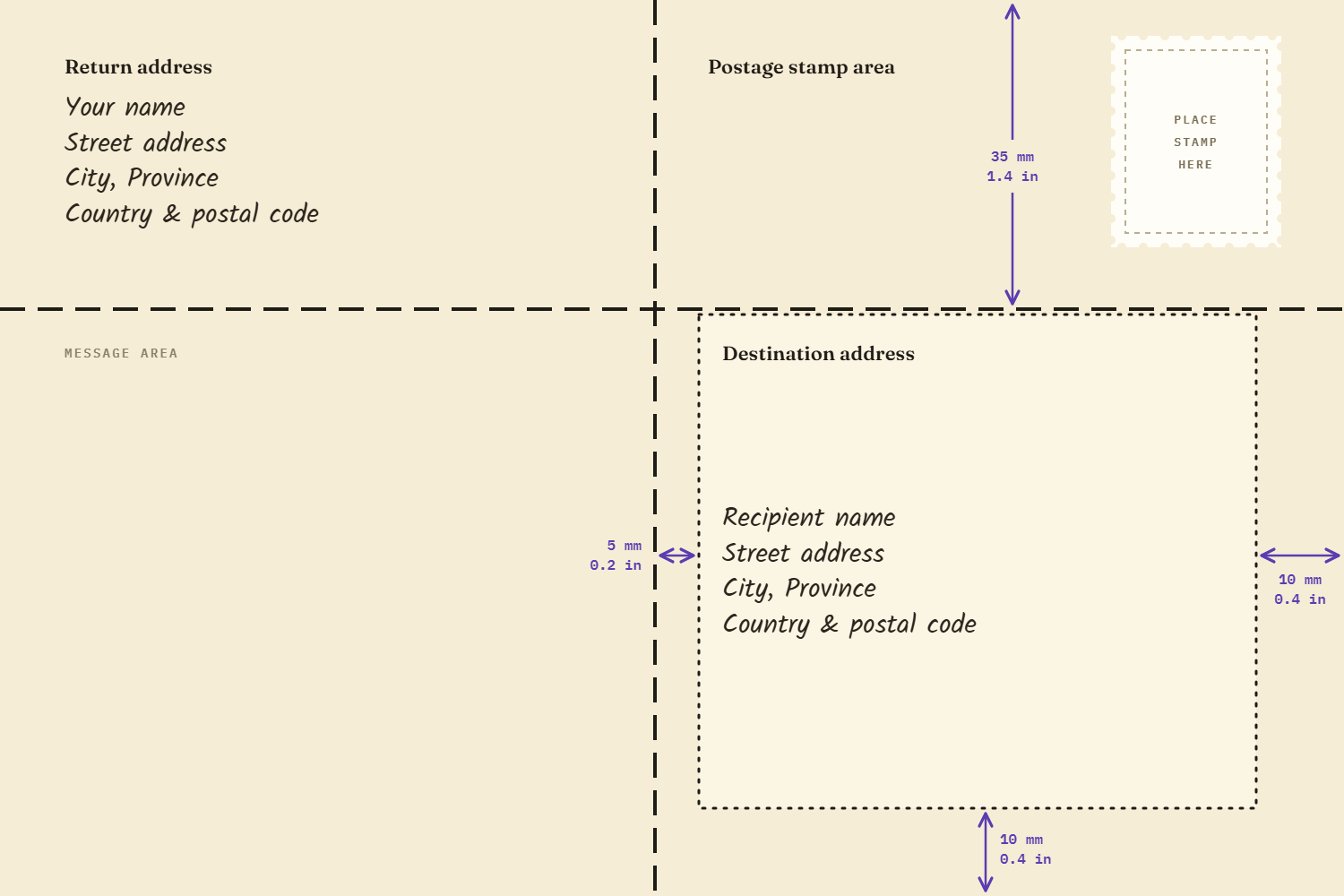
The horizontal layout: a vertical line splits the message area from the address side, the stamp sits in the top right, and the destination address keeps 10 mm (0.4 in) clear of the edges. Vertical layout of the back of your postcard
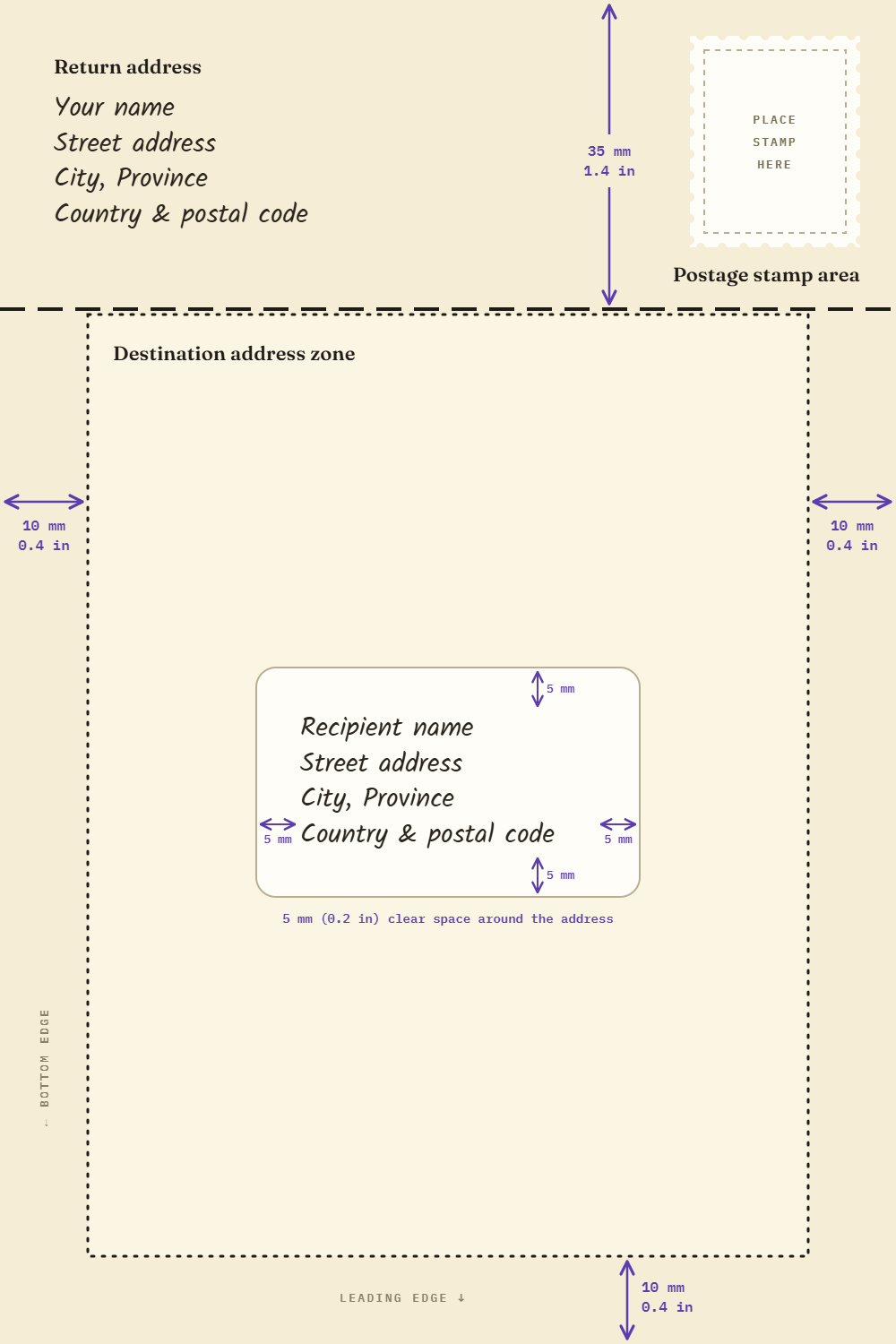
The vertical layout: a horizontal line puts the return address and stamp on top, and the whole lower half becomes the destination address zone with 5 mm (0.2 in) clear space around the address itself. Not sure how to format the address itself? See how to address a postcard.
- Print it. Print your design on one side and the address layout on the other. If you're in an "artisan" mood, you can also handwrite everything. It's really not that serious.
- Add postage. A postcard mailed within Canada needs one domestic stamp: $1.24 CAD each in a booklet, or $1.44 CAD for a single stamp. More in how much is a postcard stamp.
- Done. Drop it in a mailbox and let His Majesty's postal service do its thing.
Option 2: Design personalized postcards online with Mango Postal
We love a handmade postcard. But if you're away from home, or just want to send mail while still adding your own artistic touch, this is where Mango Postal comes in. It's a postcard maker that also does the mailing.
How it works
- Upload your photos. Pull in whatever pictures you want from your camera roll.
- Design it like an Instagram story. Arrange your photos, add text and finish your art piece.
- Add a personalized message to the back.
- Add the recipient's address.
That's it. We take care of the rest. The full walkthrough is in how to send a postcard online.
What does it cost?
Each postcard is $4.99 CAD + $0.99 for shipping, and a protective high-quality envelope is included for free.
DIY vs. online: which should you pick?
| DIY | Mango Postal | |
|---|---|---|
| You need | Printer, card stock, ruler, stamp | Your phone |
| Cost per card | Card stock + ink + $1.24–$1.44 stamp | $4.99 + $0.99 shipping |
| Time | An afternoon | 1–2 minutes |
| Print quality | Depends on your printer | 500 gsm, 100% cotton archival photo paper |
| Sends to | Anywhere, with the right stamp | Anywhere in Canada and the US |
If you love the process, DIY is satisfying and worth doing for a special one-off card. But if you're on the go, sending to several people, or want a high-quality photo on your postcard, making it online with Mango Postal is probably your best bet.
Either way, go send someone a postcard. Nobody's ever been upset to find one in their mailbox.
Need inspiration first? Browse our postcard layouts.
FAQ
How do I make my own postcard?
Design the front, print it on card stock at least 0.18 mm thick, lay out the back with space for the stamp and address, then add a stamp and mail it. Or design it online and have it printed and mailed for you.
What paper should I use for custom postcards?
Card stock of at least 0.18 mm (about 7 pt) to meet Canada Post rules. 500 gsm feels sturdier and survives the mail better.
Can I make custom postcards with my own photos?
Yes. With Mango Postal you upload photos from your phone and arrange them on a 4 × 6 card. See our photo postcards guide.
How much do custom postcards cost in Canada?
With Mango Postal, $4.99 CAD per card plus $0.99 shipping, envelope included.
Can you mail a homemade postcard?
Yes. In Canada it needs to be at least 0.18 mm thick and between 140 × 90 mm and 245 × 156 mm (235 × 120 mm if it's going to the US or abroad), with clear space on the back for the address and stamp. Add one domestic stamp and drop it in a mailbox. Here's how to address a postcard.
Make one now
Design a postcard on your phone. We print it and mail it anywhere in Canada or the US.
Build Postcard